
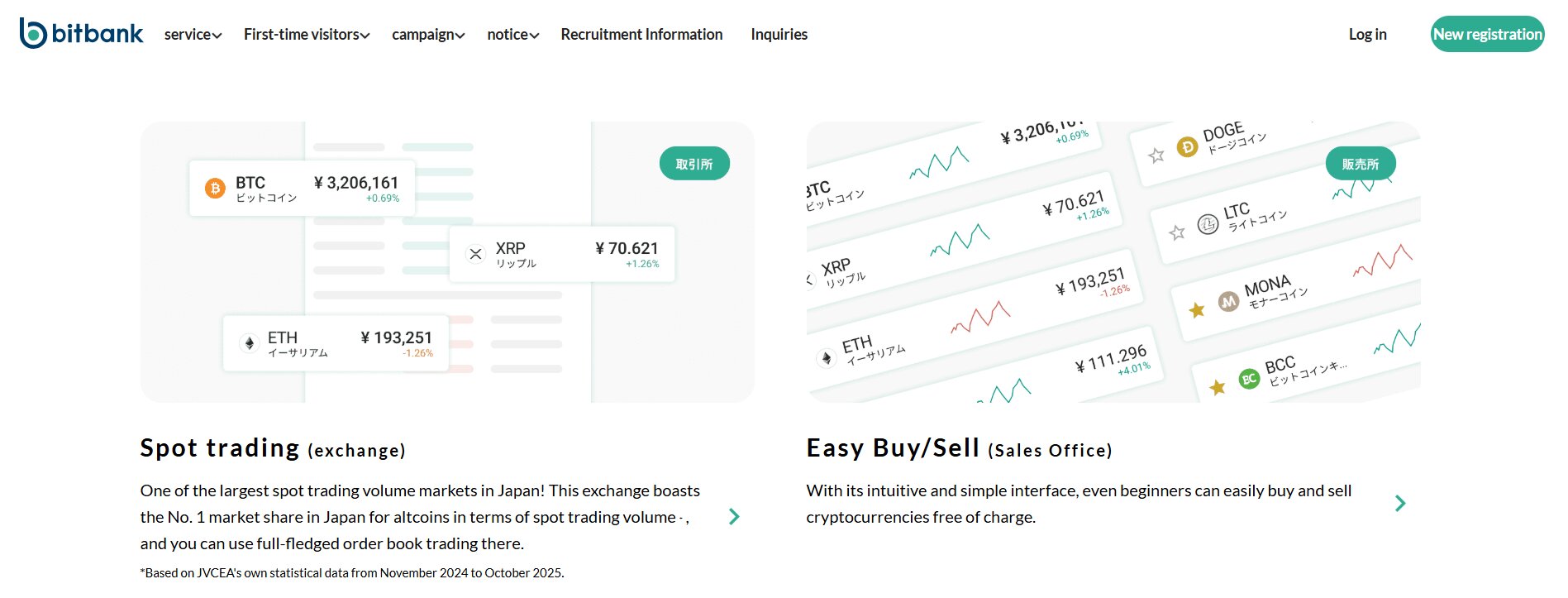
Bitbank Review 2026: Is It a Safe Japanese Crypto Exchange?
Bitbank is a regulated Japanese cryptocurrency exchange that lets you buy, sell, and trade crypto assets directly with Japanese yen. The top features of Bitbank exchange are spot trading, margin trading, crypto lending (“lend and earn”), TradingView charts, low trading fees, strong security, and a mobile trading app.
In this Bitbank review, we will cover its features, fees, supported coins, and trading tools in detail. You will also learn about its alternatives like Binance, MEXC and whether it is a safe exchange for your needs.
What Is Bitbank Crypto Exchange?
Bitbank is a centralized cryptocurrency exchange that allows you to buy, sell, and lend crypto assets against Japanese yen (JPY). The company was incorporated in May 2014 as Bitbank, Inc. and is headquartered in Tokyo.
Basically, Bitbank is registered with the Kanto Finance Bureau as a crypto asset exchange (registration number 00004) and is a full member of the Japan Virtual and Crypto Asset Exchange Association (JVCEA). Bitbank’s platform focuses on simplicity, as you can easily deposit fiat currency via local bank transfer and trade through an interface built around TradingView charts.
Where Is Bitbank Located?
The physical headquarters of Bitbank is located in the Shinagawa district of Tokyo, Japan. Well, that is why you may see the exchange sometimes called “Bitbank Tokyo”, and being based in Japan means that it falls under the direct supervision of the Financial Services Agency (FSA) and must adhere to strict capital, custody, and consumer protection rules.
Who Is the Owner of Bitbank?
Noriyuki Hirosue is the original founder and current CEO of Bitbank Inc., and he has managed the firm since its creation. He is a very respected figure in the “Japanese Blockchain Association” and has spent years advocating for better industry rules.
Also, the company is a private corporation, but it has secured massive financial backing from several Japanese giants. So, for example, a company called Ceres Inc. and the famous tech firm MIXI Inc. are major shareholders.

Bitbank Alternatives: Popular Exchanges to Consider
The top Bitbank alternatives are Binance, Bitget, and MEXC. Here is a quick comparison:
| Exchange | Supported Features | Supported Coins | KYC Mandatory | Leverage Trading | Trading Fees | Availability |
| Bitbank | Spot trading, basic order types, and fiat (JPY) support | 30+ | Yes | No | -0.02% / 0.12% | Japan Only |
| MEXC | Spot, futures, copy trading, staking, launchpad | 2,500+ | No (optional, limits apply) | Up to 200x | 0% / 0.05% | Global (not in the US) |
| Binance | Spot, margin, futures, options, staking, earn, launchpad, P2P | 600+ | Yes (mandatory) | Up to 125x | ~0.1% (discount with BNB) | Global (separate Binance.US for Americans) |
| Bitget | Spot, futures, copy trading, bots, staking, earn products | 1,600+ | Yes | Up to 125x | 0.1% (BGB discounts) | Global (not in the US) |
Bitbank is a solid exchange, but honestly, it feels very limited. You mainly get spot trading and Japanese Yen support. That’s useful only if you are in Japan. There is no futures trading, no copy trading, and no advanced earning tools. So, if you want serious trading features, you’ll quickly feel restricted.
Bitbank vs Binance
Bitbank and Binance are quite different when you look closely at what they offer. Bitbank is mainly focused on Japanese users and gives you a simple spot trading experience with fiat support in JPY. That’s good if you live in Japan and just want a clean and regulated platform. But honestly, it feels limited once you compare it with Binance. Binance gives you spot, margin, futures, options, staking, earn products, and even P2P trading. Plus, you get access to hundreds of coins and much deeper liquidity.
You also need to consider leverage and advanced tools. Bitbank does not offer futures or leverage trading, while Binance allows up to 125x leverage. Hence, if you are planning to move beyond basic trading, you can use our Binance referral code to register and get fee discounts and extra welcome rewards.
Bitbank vs MEXC
MEXC is built for global users who want more trading options and higher risk-reward opportunities. MEXC offers over 2,500+ coins, which is a huge difference compared to Bitbank’s limited listings. You also get futures trading with up to 200x leverage, copy trading, staking, and launchpad access. Bitbank does not provide any of these features.
Now, another important point is KYC. Bitbank requires full verification, while MEXC does not require ID verification from beginners. You can trade anonymously and withdraw up to 10 BTC per day. Again, fees are also quite lower on MEXC, as you get frequent zero-fee campaigns. So, if you want access to more altcoins and advanced tools, you can use our MEXC referral code to sign up and grab some beginner rewards.
Create an account with MEXC and start trading now!
Bitbank vs Bitget
Bitget is mainly known for advanced derivatives trading and copy trading. It supports thousands of coins and includes futures trading with up to 125x leverage. It also offers copy trading. Here, you can follow top traders automatically. Bitbank does not offer anything like that.
Now, another thing is accessibility, as Bitget is available globally, while Bitbank is mainly restricted to Japan. So, most users will find Bitget easier to access. Hence, if you are looking for a more advanced platform, you can use our Bitget referral code to register and get fee discounts.
As a new user on Bitget, you can get a 20% discount on trading fees when you use our Bitget referral code to sign up!

What Countries Does Bitbank Support and Restrict?
Bitbank focuses its services almost entirely on residents of Japan, and they have very strict residency requirements for all new accounts. You must live in Japan and possess a valid Japanese phone number and a residential address to pass the sign-up process.
Also, if you are a foreigner living in Japan on a work visa, you can easily open an account after meeting the required KYC details. But if you live in the United States, the United Kingdom, or Canada, the platform will block your registration. It is primarily a “Japan-only” platform for individuals, so almost every trader you see in the order books is a local resident.
Well, Bitbank offers corporate accounts to entities registered outside of Japan as long as they meet strict documentation requirements such as a corporate certificate, details on shareholder composition, and proof of address for the company’s representative. But even then, you should note that fiat transactions remain denominated only in Japanese yen.
What Cryptocurrencies Are Available on Bitbank?
You can trade over 30 different cryptocurrencies on Bitbank. Well, that means it supports top blue-chip cryptos only. The exchange does not list every new “meme coin” because every token must get approval from the Japan Virtual and Crypto Assets Exchange Association (JVCEA). So, this means the coins on the platform are vetted for security and legitimacy before you can buy them.
The main list of available coins includes:
- Bitcoin (BTC)
- Ethereum (ETH)
- Ripple (XRP)
- Litecoin (LTC)
- Polkadot (DOT)
- Dogecoin (DOGE)
- Solana (SOL)
- Avalanche (AVAX)
Bitbank Review: Pros and Cons
What Are the Advantages of Using Bitbank?
- Regulated trading environment: Bitbank is fully licensed in Japan and follows the FSA’s regulations. Well, this gives you more confidence that the company segregates customer funds and follows robust custody standards.
- Simple fiat on‑ramps: JPY deposits via bank transfer are free, and you can withdraw yen to your bank account with small flat fees only.
- Margin and lending services: You can trade with leverage up to 1:2 on BTC/JPY, ETH/JPY, and XRP/JPY pairs. Plus, the lending program pays up to around 5% per year on supported coins.
- Robust security: The exchange uses multi‑signature cold storage, mandatory two‑factor authentication, ISO 27001 certification, and is insured against theft. Also, Bitbank has never suffered a hack.
- Mobile app and TradingView integration: The platform’s native Android and iOS apps mirror the desktop trading experience with real‑time charts, technical indicators, and smooth order execution.
What Are the Disadvantages of Using Bitbank?
- No Global Personal Accounts: Only residents of Japan can open individual accounts.
- Single Fiat Currency: You can only use Japanese Yen (JPY). They do not support USD, EUR, or other currencies.
- Withdrawal Fees: The cost to move Bitcoin to a private wallet is often higher than the industry average.
- Limited Features: You will not find futures, options, or high-leverage trading here.
- Modest customer support options: There is no phone hotline. You can only interact through a ticket system or a Japanese‑language chatbot, which can sometimes obviously frustrate non‑Japanese speakers.
Bitbank Review: Fees Explained
There are different types of Bitbank fees, such as trading fees, withdrawal fees, and deposit fees. Currently, the trading fees are -0.02% maker and 0.12% taker, whereas there are no deposit and withdrawal fees (only network gas fees).
Bitbank Trading Fees
The trading fee for a “maker” is -0.02%, while the “taker” fee is 0.12% for most trading pairs. Well, this means if you place a limit order that sits in the book (a maker order), Bitbank pays you a rebate of 0.02% (negative maker fees) when someone else fills it.
So, if you use the “Market” button to buy instantly, you are a taker, and you pay the full 0.12% fee. You should always try to use limit orders to get that negative fee.
Order Type | Fee Rate |
| Maker (Limit Order) | -0.02% (You get a rebate) |
| Taker (Market Order) | 0.12% (You pay a fee) |
Bitbank Deposit and Withdrawal Fees
Depositing Japanese Yen via bank transfer is totally free on the Bitbank side, though your bank might charge a small fee for the wire. Now, when you want to send your JPY back to a bank account, you have to pay a fixed fee.
- Withdrawals below 30,000 JPY: You pay 550 JPY.
- Withdrawals above 30,000 JPY: You pay 770 JPY.
Again, crypto withdrawal fees are fixed for each coin and do not change based on the amount you send. So, for Bitcoin (BTC), the fee is 0.0006 BTC (subject to change), which can be quite expensive when the price is high, and for Ripple (XRP), the fee is only 0.1 XRP, which is basically pennies.
Bitbank Review: Best Features and Trading Tools
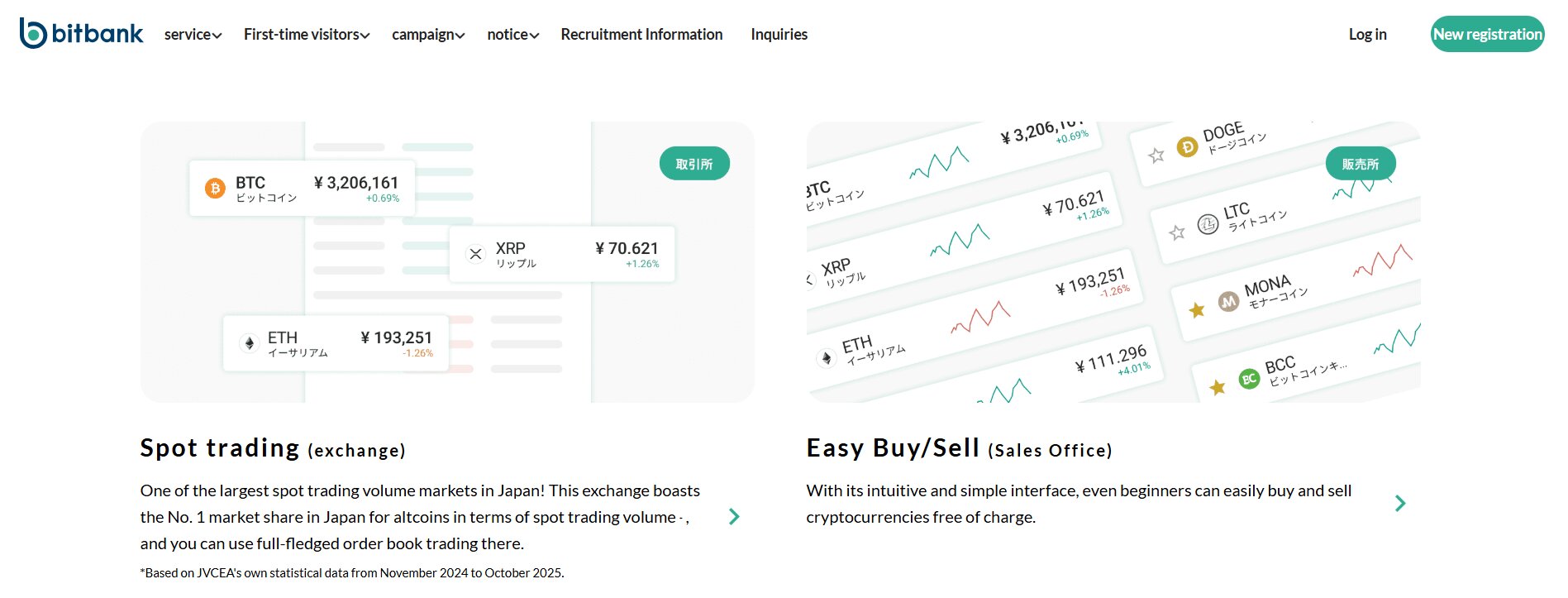
The top trading features of Bitbank are spot trading, margin trading with 2x leverage, crypto lending services to earn passive income, and a sales outlet for new users to buy crypto instantly without order books.
Bitbank Spot Trading
Spot trading is the main service on Bitbank, where you trade real assets for immediate delivery. Bitbank’s order book displays bids and asks for each crypto‑JPY pair. You can place a limit order specifying your desired price; so, if your order sits in the book until matched, you act as a maker and earn a small rebate. Alternatively, you can also place a market order that executes instantly against the best available prices; in this case, you are a taker and pay a small fee.
Also, liquidity on the major pairs (BTC/JPY, ETH/JPY, XRP/JPY) is quite strong, with spreads often under one basis point and deep order books. You can even view candlestick charts, change time frames from one minute to one month, and overlay indicators directly in the trading interface.

Bitbank Margin Trading
Margin trading allows you to amplify your position by borrowing funds from the exchange. Right now, on Bitbank, you can trade with up to 2x leverage only, not the high leverage you see on a few crypto exchanges like Bitget or MEXC. Also, margin trading accounts are only available after completing additional verification.
Generally, you must already hold a standard Bitbank account and then apply for a margin account through the account dashboard. The exchange requires you to answer a risk quiz, provide details on your occupation and income, and complete SMS authentication.
Now, once approved, you can easily trade the BTC/JPY, ETH/JPY, and XRP/JPY pairs using borrowed funds. You can open long positions by borrowing yen to buy crypto, or even open short positions by borrowing crypto to sell and later repurchase at a hopefully lower price. The interest rate on borrowed funds resets daily.
Bitbank Crypto Lending Services
Bitbank offers a “Lend for Interest” program where you can earn passive income on your idle coins. You essentially sign a contract to lend your Bitcoin, Ethereum, or other coins to the exchange for a fixed term of one year. Then, in return, the exchange pays you an interest rate. The annual interest rates typically range from 1% to 5%, depending on the specific coin.
You can lend Bitcoin, Ethereum, XRP, Monacoin, Polkadot, Dogecoin, and many others. Even though there is no exact minimum quantity for some coins, others require a small threshold (for example, 0.0001 BTC or 1 ADA). It is a great tool if you are a “HODLer” who doesn’t plan on selling for a few years.
Bitbank Sales Outlet
The “Sales Outlet” is a simplified section of the website for users who find the professional trading screen too scary. You can buy or sell coins instantly with just one click at a price set by Bitbank. While this is very fast and easy, it is usually more expensive (more spread) than using the regular exchange.
The sales outlet incorporates a spread between the buy and sell price that is typically wider than the fees on the exchange. Here, you might see spreads of 0.5% to 1% on major coins and higher on small coins. But again, the outlet is quite popular among users who value speed over price.
How To Open a Bitbank Account and Start Trading?
Step 1: Create a Bitbank account
You need to visit the official website or download the app. You can either use your browser to go to bitbank.cc or download the Bitbank app from the Google Play Store or Apple App Store. Now, on the home page or in the app, select the “Sign Up” button to begin registration.
You should enter a valid email address, and then Bitbank will send a verification link to this address. You need to open the verification email and click the link to confirm your address. This step also prompts you to create a strong password.

Step 2: Complete know‑your‑customer verification
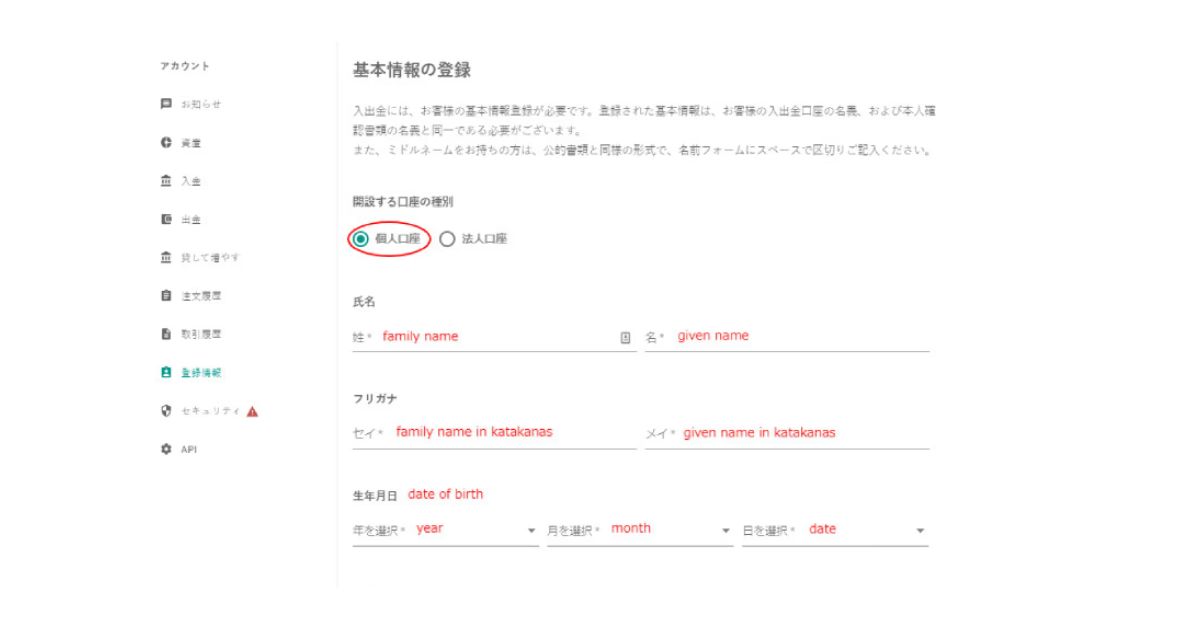
Here, you will need to provide your full name, address, date of birth, and other personal details. Then upload a government‑issued photo ID such as a driver’s licence or passport. Japanese residents may also need to submit a residence card or My Number card.
Step 3: Deposit funds and start crypto trading
Now, navigate to the deposit page, choose JPY deposit for fiat, or select your desired crypto asset to view its deposit address. Also, if you deposit yen, you might see the bank details for GMO Aozora or SBI Sumishin Net Bank.
You can go to the trading page after funding your account, choose the pair you want to trade, and place your order. Also, if you want to open a margin account, submit a separate application through the registration menu after your spot account is active.
How To Deposit on Bitbank?
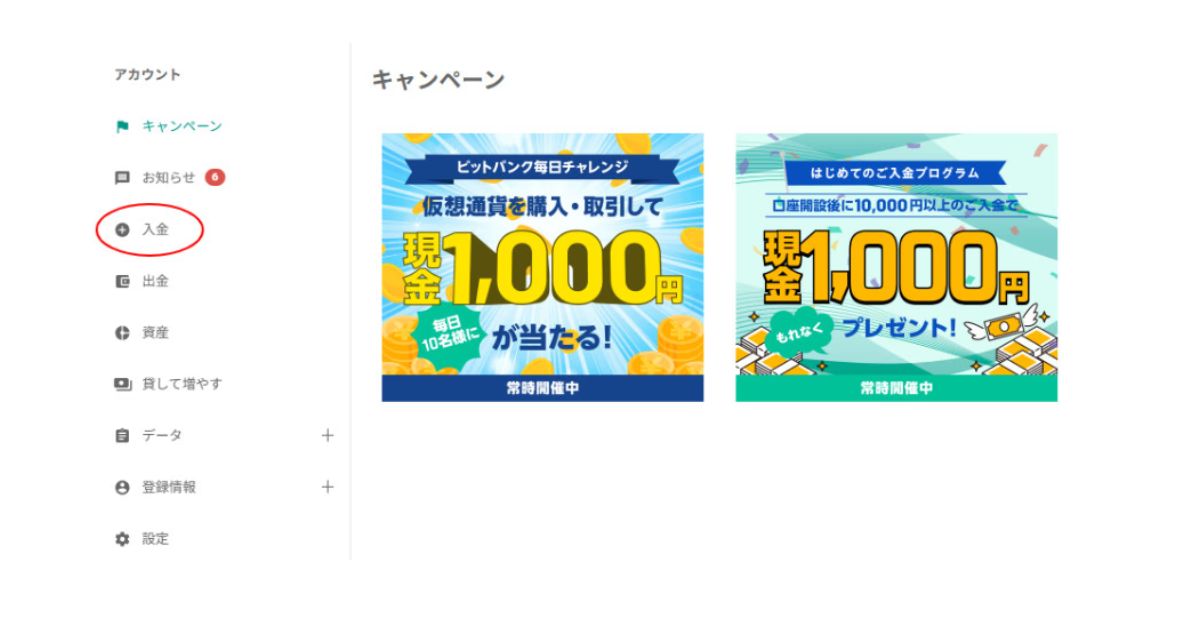
- Open the deposit menu: You need to log in and click the “Deposit” button in the account dashboard.
- Select Japanese Yen: You can choose the JPY option here, and then you will be given the choice between GMO Aozora Net Bank and SBI Sumishin Net Bank.
- Transfer funds from your bank: Now, you can use online banking or a banking app to send money to the designated Bitbank account. Well, deposits are usually credited within minutes during bank hours for GMO Aozora transfers, but transfers from other banks may be processed on the next business day.
- Deposit crypto: Also, if you want to deposit Bitcoin or another cryptocurrency, click the corresponding asset in the deposit menu. Bitbank will show you a unique wallet address. You can send your crypto from your external wallet to that address, and after network confirmations, your balance will update. There is no deposit fee.
How To Withdraw From Bitbank?
- Select coin to transfer: You need to go to the withdrawal page and select the crypto asset you wish to transfer out.
- Enter withdrawal address: You can either choose from your list of saved addresses or click “Add Address” to register a new withdrawal destination.
- Specify the amount to withdraw: You can now enter the amount to withdraw. It must cover the fees as well.
- Confirm: You need to enter your two‑factor authentication code and confirm. Bitbank will send a confirmation email; complete the process by clicking the link. Hence, after final approval, your withdrawal will be broadcast to the blockchain. The transaction details, including the TXID, will appear in your withdrawal history.
Bitbank Security Measures Review
The Bitbank security measures include industry best practices such as regulatory compliance, cold storage with multi-sig, hot wallet security, mandatory 2FA, and advanced information security with ISO certificates.
- Regulatory compliance: The exchange is authorized by the Japanese Financial Services Agency (registration number 00004) and is a member of the JVCEA, Japan Crypto Asset Business Association, Japan Digital Finance Association, and other industry bodies.
- Cold storage with multi‑signature: The majority of user assets are actually stored offline in cold wallets secured by a multi‑signature system.
- Hot wallet security: Generally, client assets needed for daily withdrawals are kept in hot wallets protected by both physical and virtual key management systems. Plus, access is restricted to only authorized personnel.
- Two‑factor authentication: It is mandatory for all accounts to activate 2FA for withdrawals. You can choose between an authenticator app and SMS codes. Plus, Bitbank also enforces email confirmations for each withdrawal request.
- Information Security Management System: Bitbank holds an ISO/IEC 27001:2013 certification. The company undergoes regular external audits to maintain the certification.
Bitbank Customer Support and User Experience
Bitbank offers customer support through a ticket system on its website and app, with most queries answered within 24 hours. It also provides a Japanese-language chatbot and a detailed knowledge base covering deposits, withdrawals, KYC, 2FA, and margin trading. However, most support resources are only available in Japanese.
Overall, Bitbank receives positive feedback from local traders for its fast interface, stable order execution, and reliable charts. The mobile app holds a 3.9-star rating on Google Play with over 500,000 downloads. Still, the platform remains heavily focused on Japanese users, which may be challenging for international traders.
For global users looking for a more international-friendly platform with full English support, exchanges like MEXC may be a more suitable alternative.
Join millions of traders worldwide on MEXC!

Conclusion: Is Bitbank a Safe and Reliable Crypto Exchange?
To sum up our Bitbank review, it is a safe and highly reliable exchange that provides a professional environment for any trader living in Japan. You see, the platform has spent over a decade building a strong reputation for security, transparency, and high liquidity. You get to trade on one of the most stable systems in the world while paying some of the lowest fees in the industry.
Honestly, the only major “negative” is the strict geographic restriction that keeps most global users out. Plus, its service range is narrower than that of global exchanges that offer futures, high leverage, and copy trading. Hence, we would say that it is a safe and reliable crypto exchange for residents of Japan who value regulation, low fees, and a straightforward trading experience.
The post Bitbank Review 2026: Is It a Safe Japanese Crypto Exchange? appeared first on CryptoNinjas.
CryptoNinjas